 Product Tabs Studio
Tools, health and data
Products → Tabs Tools & Health is where migrations run, where the plugin reports on the state of the site, and where tabs are exported and imported. It needs the manage_woocommerce capability.
Health checks
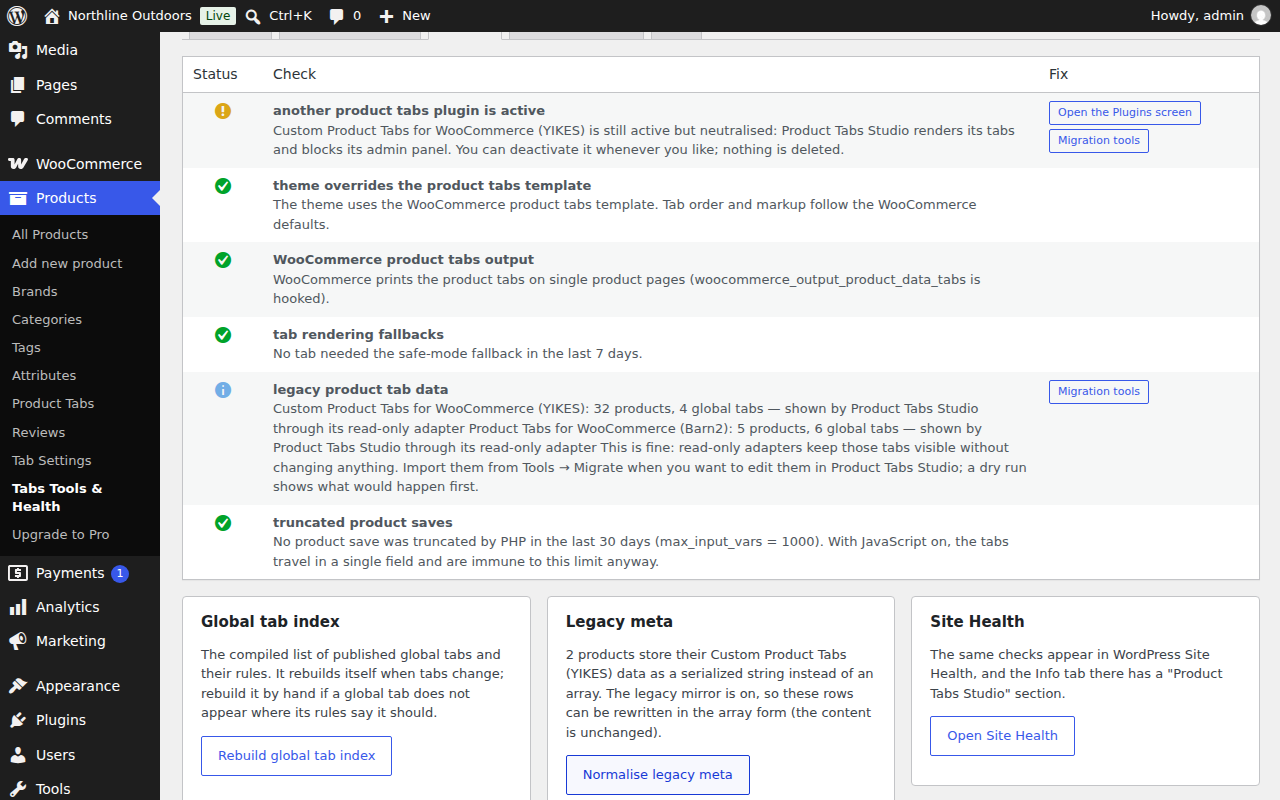
Each check explains what it found and, where there is one, offers the fix as a button:
- Another product tabs plugin is active. Names it and says what that means for rendering.
- Theme overrides the product tabs template. Informational: it tells you the tab markup comes from your theme, not WooCommerce.
- WooCommerce product tabs output. Critical if a classic theme has removed the hook that prints tabs at all, with the shortcode alternative.
- Tab rendering fallbacks. Reports panels that had to fall back to a simpler rendering pipeline in the last seven days.
- Legacy product tab data. How many products and global tabs are being read through adapters.
- Truncated product saves. Reports saves refused because the form was cut short, and shows the current
max_input_varsvalue.
Two maintenance actions sit under the checks. Rebuild global tab index recompiles the list of published global tabs and their rules, which the front end reads instead of querying. Normalise legacy meta rewrites legacy rows that are stored as a serialized string into the array form, leaving the content unchanged.
The system report
The System report tab produces a block of text with a Copy to clipboard button. Paste it into a support request and most questions are answered before they are asked. It contains: WordPress, WooCommerce, PHP and plugin versions; the active theme and its parent; the active plugins with their versions; the plugin's settings; counts of products with native tabs, products read through adapters and global tabs by mode; whether your theme overrides the WooCommerce tabs template and from which file; whether WooCommerce's tabs output is still hooked; every callback attached to the product tabs filter with its priority and source file; max_input_vars and the memory limit; whether the theme is a block theme; which page builder was detected; whether WPML or Polylang is present; and the last fifty entries of the activity log.
The same information is added to WordPress Site Health under Info, and the health checks above are registered as Site Health tests.
The activity log
The Log tab lists what the plugin recorded: refused saves, rendering fallbacks, key renames, order changes, migration steps and decoding problems. It can be cleared. It is a local table, never sent anywhere.
Export and import
The Import / Export tab writes a JSON bundle containing the relevant settings, every global tab with its rules, and the per-product tabs with each product's id and SKU. Export runs in batches so large catalogues do not exhaust memory.
Import takes that file back:
- Merge updates global tabs matched by key and merges product tabs row by row.
- Replace overwrites the content of matched global tabs and replaces a product's tabs entirely.
- Dry run produces a summary of the differences without writing.
Products are matched by SKU first and then by id, so a bundle from staging lands correctly on a production site with different post ids. Every product write is recorded in that product's version history with the reason "import", so an import can be undone product by product. The uploaded file is stored in a protected directory and deleted when the job finishes.
WooCommerce CSV
The WooCommerce product exporter includes the tabs as the column Meta: _ptstudio_tabs, holding the JSON as written. The WooCommerce product importer accepts that column back and validates it before storing. The legacy column from Custom Product Tabs for WooCommerce is accepted too, including its serialized form, and is converted on import.
Note the asymmetry with the rest of WooCommerce: the CSV importer can bring tabs in through this column, but a normal CSV import that does not map the column leaves existing tabs untouched. That is deliberate.
Uninstalling
Deleting the plugin removes nothing by default. Two checkboxes under Tab Settings → Data opt in to deletion, and both are off unless you turn them on. The first removes this plugin's own data: the settings, the global tabs, and the per-product tabs with their version history. The second only takes effect together with the first and goes one step further, removing the copies of product tabs kept in the Custom Product Tabs (YIKES) format, after which switching back to that plugin is no longer possible. Barn2 and WB data is never touched by this plugin's uninstaller.
Export a JSON bundle before uninstalling with deletion enabled. See Recovering lost tabs for what is and is not recoverable afterwards.